数据下行接口
物联网平台通过数据下行接口将数据推送给指定的传感器终端
首先需要登录物联网平台,点击右上角的用户名,进入“个人中心”,在“个人中心”中获取Api-key和Api-secret

请求协议:HTTP
请求类型:POST
请求地址:http://service.easylinkin.com/api/down
请求Headers:
| Key | Value | 字段说明 |
|---|---|---|
| Content-Type | application/json | POST请求方式 |
| api-key | - | 每个账户会自动生成32字符的api密钥,如:da9cce31291348e3b3e6ff21b3d69329 |
| Nonce | - | 8字符的随机数,每字符为0~9,如:00123456 |
| Timestamp | - | 毫秒格式的当前时间戳,(自1970-01-01 00:00:00开始的毫秒数);LinkOS会拒绝超过3分钟之前生成的请求,如1573716339046 |
| Signature | - | 每个账户会自动生成32字符的api-secret,如:cd1f59df0aa74a28b4f9397926efd6,以”[Nonce][Timestamp][api-secret]”形式拼接字符串,并计算SHA1值,作为Signature值,如:“001234561573716339046cd1f59df0aa74a28b4f9397926efd6”计算结果为:28a5160557069d23eb8c10a531599ad60e4030d8,以小写形式填写 |
import java.security.MessageDigest;

/**
 * 授权方式
 */
public class LinkThingsUtil {

  private String apiSecret;
  private String apiKey;
  private String nonce;
  private String timestamp;
  private String signature;

  public LinkThingsUtil(String apiKey, String apiSecret) {
    this.apiKey = apiKey;
    this.apiSecret = apiSecret;
  }

  private String nonceGen() {
    String res = "";
    for (int i = 0; i < 8; i++) {
      res += (int) (Math.random() * 10);
    }
    return res;
  }

  public String getSha1(String str) {

    char hexDigits[] =
        {'0', '1', '2', '3', '4', '5', '6', '7', '8', '9', 'a', 'b', 'c', 'd', 'e', 'f'};
    try {
      MessageDigest mdTemp = MessageDigest.getInstance("SHA1");
      mdTemp.update(str.getBytes("UTF-8"));
      byte[] md = mdTemp.digest();
      int j = md.length;
      char buf[] = new char[j * 2];
      int k = 0;
      for (int i = 0; i < j; i++) {
        byte byte0 = md[i];
        buf[k++] = hexDigits[byte0 >>> 4 & 0xf];
        buf[k++] = hexDigits[byte0 & 0xf];
      }
      return new String(buf);
    } catch (Exception e) {
      return null;
    }
  }

  public void update() {
    nonce = nonceGen();
    timestamp = System.currentTimeMillis() + "";
    signature = getSha1(nonce + timestamp + apiSecret);
  }

  public String getApiSecret() {
    return apiSecret;
  }

  public void setApiSecret(String apiSecret) {
    this.apiSecret = apiSecret;
  }

  public String getApiKey() {
    return apiKey;
  }

  public void setApiKey(String apiKey) {
    this.apiKey = apiKey;
  }

  public String getNonce() {
    return nonce;
  }

  public void setNonce(String nonce) {
    this.nonce = nonce;
  }

  public String getTimestamp() {
    return timestamp;
  }

  public void setTimestamp(String timestamp) {
    this.timestamp = timestamp;
  }

  public String getSignature() {
    return signature;
  }

  public void setSignature(String signature) {
    this.signature = signature;
  }
}
import java.io.IOException;
import okhttp3.MediaType;
import okhttp3.OkHttpClient;
import okhttp3.Request;
import okhttp3.RequestBody;
import okhttp3.Response;

public class ApiDownTest {

  static String v1_app_key = "api_key";
  static String v1_apiSecret = "api_secret";

  LinkThingsUtil u = new LinkThingsUtil(v1_app_key, v1_apiSecret);


  public static void main(String[] args) {
    ApiDownTest t = new ApiDownTest();
    t.device_api_down();
  }

  String getUrl() {
    String url = "http://service.easylinkin.com";
    return url;
  }


  Request.Builder addHeader(Request.Builder builder) {
    u.update();
    builder.addHeader("api-key", u.getApiKey()) //
        .addHeader("nonce", u.getNonce()) //
        .addHeader("timestamp", u.getTimestamp()) //
        .addHeader("signature", u.getSignature()); //
    return builder;
  }

  public void device_api_down() {
    OkHttpClient client = new OkHttpClient().newBuilder().build();
    Request.Builder builder = new Request.Builder();
    MediaType mediaType = MediaType.parse("application/json");
    RequestBody body = RequestBody.create(mediaType,
        "{\"confirm\":1,\"device_id\":\"00137A100000CCA12\",\"parameter\":{\"alarm_switch\":\"0\",\"alarm_duration_time\":10,\"strobe_mode\":\"01\",\"alarm_mode\":\"00\"},\"service_id\":\"alarm_control\"}");
    builder.url(getUrl() + "/api/down").method("POST", body);
    addHeader(builder);
    Request request = builder.build();
    try {
      Response response = client.newCall(request).execute();
      System.out.println(response.body().string());
    } catch (IOException e) {
      e.printStackTrace();
    }
  }

}
请求数据格式:JSON形式
| 参数名称 | 字段类型 | 是否必填 | 字段说明 |
|---|---|---|---|
| device_id | string | 是 | 目标设备ID |
| service_id | string | 是 | 准备调用的设备服务的服务Id,数据不需解析的情况,填写“transparent” |
| payload | string | 否 | 准备发送给设备的数据,payload与parameter至少需填写一方,由设备数据格式而定,该参数为历史版本使用较多的参数,数据推送选择v2版本时请使用该参数 |
| parameter | object | 否 | 准备发送给设备的命令参数,payload与parameter至少需填写一方,由设备数据格式而定,数据推送选择v3版本时请使用该参数 |
| clear | int | 否 | 0:无操作;1:清空尚未下行的数据,针对LoRaWAN设备有效 |
| schedule | int | 否 | 0:普通;1:高优先级 |
| confirm | int | 否 | 0:不需要应答;1:需要应答 |
请求响应:
| 参数名称 | 字段类型 | 是否必填 | 字段说明 |
|---|---|---|---|
| code | string | 是 | HTTP响应状态码,0表示成功 |
| msg | string | 是 | 状态描述 |
| request_id | string | 否 | 本次下行的请求ID,如不需要回应返回空 |
设备支持的具体下行能力,请在型号管理中查看对应设备的数据规格
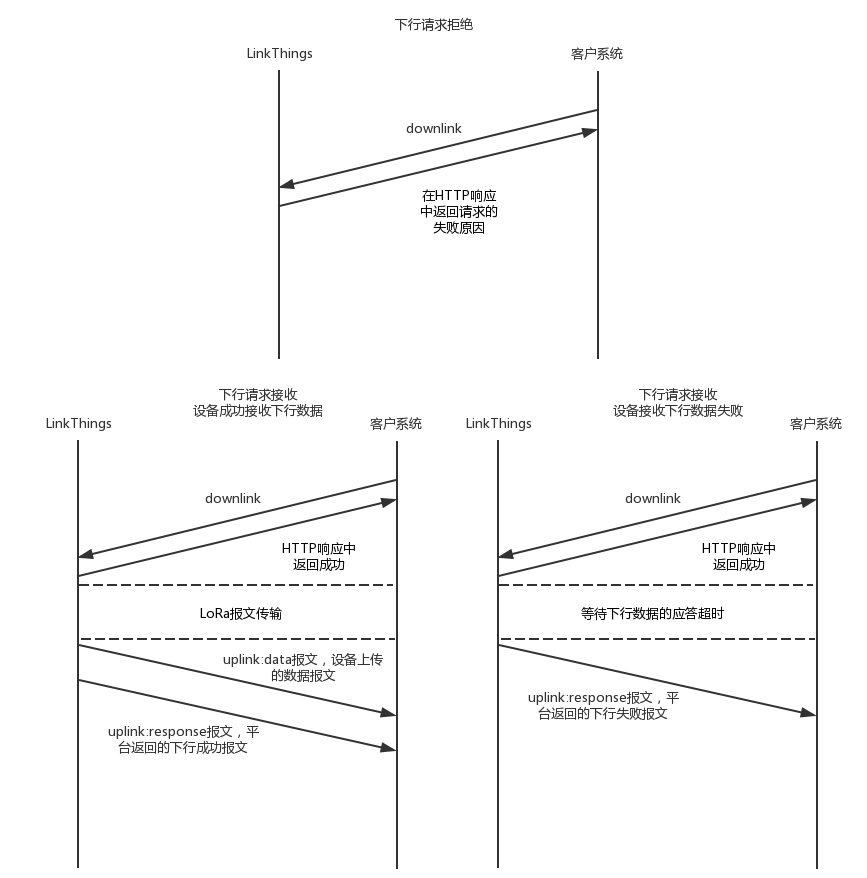
下行请求交互逻辑如下图: